

Appearance
Projects
The Projects page is used to create, delete and download projects. Projects that contain GPS data can be plotted and inspected on a map.
A description of the map controls and buttons can be found on the survey page.
Project List
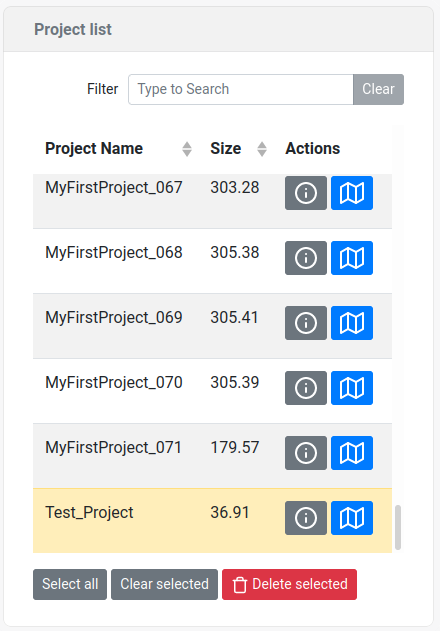
The currently active project is shown in a yellow highlight.
Info
The maximum project size is 300 MB, if this limit is exceeded, the project is split internally. This only affects the way projects are downloaded. When this occurs, the download button will open a pop-up where the project can be downloaded in parts. Split parts are appended by a number in the format _xxx
Create new project
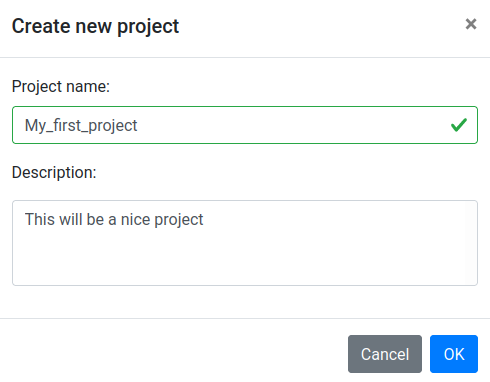
Clicking the New Project button will open up a pop-up in which a project name and a project description can be inserted.
| Entry | Description | |
|---|---|---|
 |  | Open the project creation tab |
| Project name | The name of the project. Note that the names have to be at least 3 characters long, contain only a-z, A-Z, 0-9 and the _ character. If the project name already exists the creation will generate an error. | |
| Description | A text description of the project (optional, can be blank) |
Project info
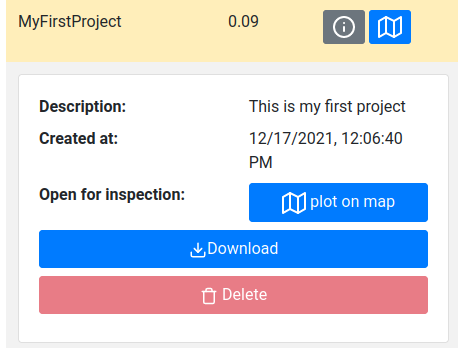
By clicking on the info button of a project the project can be inspected, downloaded and deleted.
| Entry | Description |
|---|---|
 | This button will open up the project inspection tab |
  | This button will plot the project on the map |
| Description | The description of the project given when creating a project |
 | Download the project. When downloading a project, the data files associated with the project are zipped and then transferred to the user. Inside the ZIP file are .JSON files that can be loaded and reanalyzed by Gamman. There are separate concentrations.csv, monster.json and sample.json files that contain the recorded monsters and samples respectively. The concentrations can be downloaded manually by using the dropdown option. |
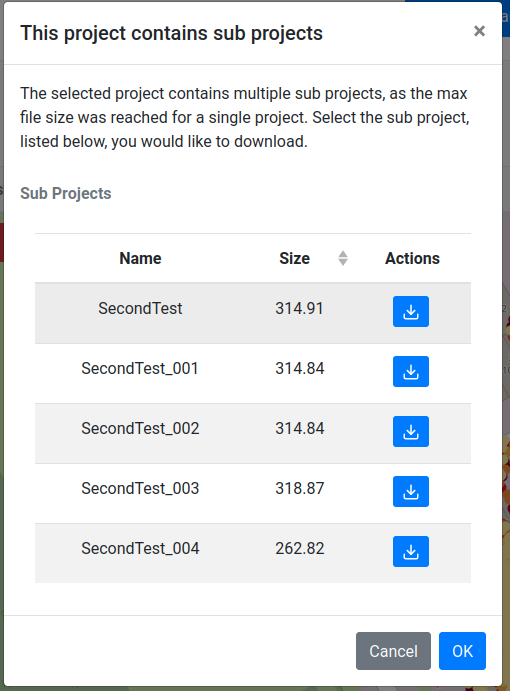 | If the project size exceeds 300 MB, the data is internally split into sub projects. When the download button is pressed a window will open that shows the sub project present and each sub project can be downloaded manually. Split parts are appended by a number in the format _xxx. |
 | Delete the project. Note that the currently selected project cannot be deleted. |