

Appearance
Settings — Sensors
The Sensors settings section configures the behaviour of each connected sensor. Navigate to Settings → Sensors to open it.
It is divided into four tabs: Gamma, Spectral, GPS, and PTH.
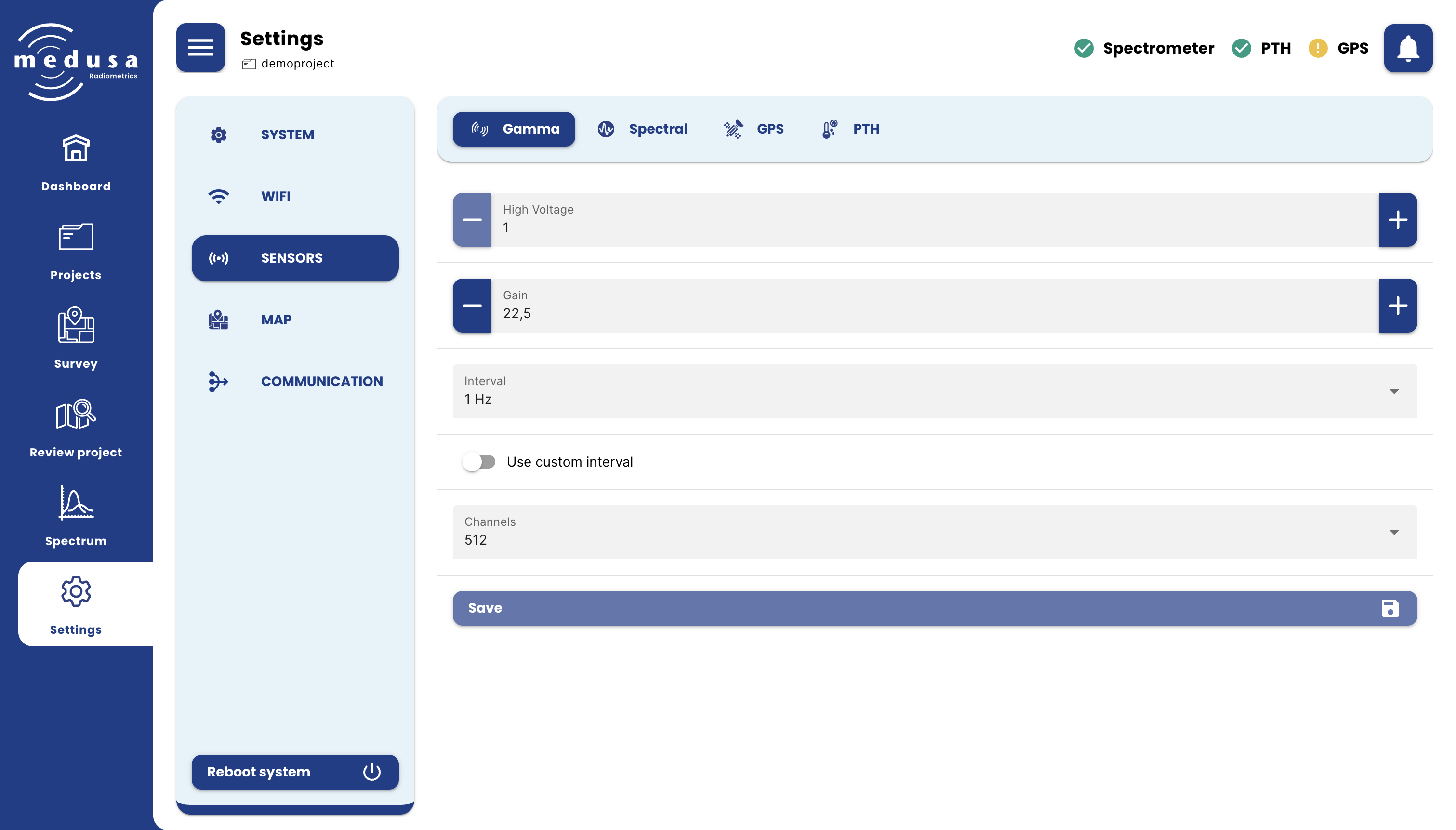
Gamma
The Gamma tab configures the hardware settings of the gamma spectrometer.
| Setting | Description |
|---|---|
| High voltage | (Only visible for systems that use photmultiplier tubes (PMT)) The high voltage applied to the PMT. The default value is unique to each detector and set by Medusa before shipping. |
| Gain | (Only visible for systems that use silicon photomultiplier) The gain applied to the analog signal coming out of the detector. The default value is unique to each detector and set by Medusa before shipping. |
| Interval | How often the spectrometer measures a spectrum. Options: 5 Hz, 2 Hz, 1 Hz, 0.5 Hz, 0.1 Hz. |
| Use custom interval | When enabled, a custom measurement interval can be entered in milliseconds (200–300,000 ms). |
| Channels | The number of channels in the measured spectrum. Options: 256, 512, 1024, 2048 (and 4096 available upon request). Default is 512. > Info > > 512 channels is the standard configuration in geophysics, and most commonly used processing tools are designed around this channel count. Changing the number of channels is therefore only recommended in specific situations where there is a clear technical justification. |
Note
Warning: The gamma spectrometer is carefully calibrated before leaving the Medusa office. Only change these settings if you have a specific reason to do so. Incorrect gain settings can result in poor or incomplete spectra.
Info
Note: Short measurement intervals fill storage much faster. For most surveys, 1 Hz is sufficient.
Click Save to apply changes.
Spectral
The Spectral tab configures how spectrometer data is processed and which calibration files are used.
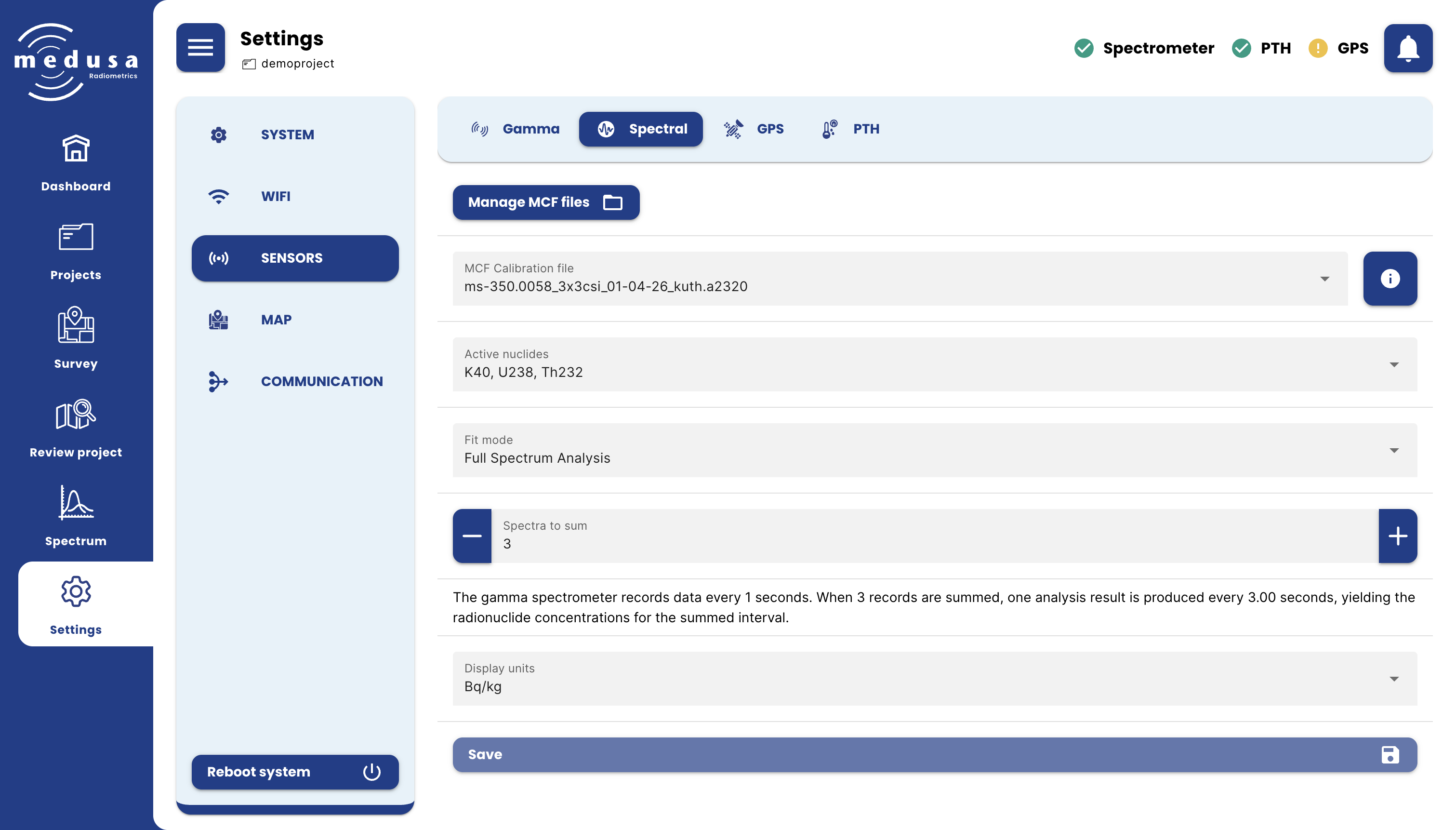
Managing MCF Files
Click Manage MCF files to open a dialog for uploading or deleting MCF files stored on the detector. The maximum file size for uploading is 1 MB. Deleting an MCF file cannot be undone.
MCF Stabilization and Calibration Files
| Setting | Description |
|---|---|
| MCF Calibration file | The MCF file used for spectral analysis and calculating radionuclide concentrations. Click the  button to view its contents. button to view its contents. |
MCF files are detector-specific and cannot be used on a different sensor. See Viewing the Spectrum — The Calibration File for a description of the MCF contents viewer.
Active Nuclides
Selects which nuclides are included in the spectral analysis. The available nuclides depend on the active MCF Calibration file. Active nuclides determine which concentrations are shown on the Spectrum page, included in sample measurements, and written to the Concentrations CSV on download.
Fit Mode
| Mode | Description |
|---|---|
| Full Spectrum Analysis (FSA) | Fits standard spectra to the measured data. Default mode. |
| NNLS Full Spectrum Analysis | Same as FSA, but only includes standard spectra that result in a positive concentration. Useful when negative concentrations are undesirable — see Troubleshooting. |
| Windows Analysis | Uses fixed energy windows to determine concentrations. |
Spectra to Sum
The number of spectra accumulated before one analysis result is calculated. Increasing this value reduces uncertainty in individual data points but coarsens the spatial resolution of the measurement — each data point then represents a longer time interval.
Info
Note: The number of spectra to sum is independent of the gamma-ray measurement interval. If the measurement interval is changed, review the spectra-to-sum setting to maintain the desired output frequency of analyzed records.
Display Units
The unit used to display radionuclide concentrations in the interface.
| Unit | Notes |
|---|---|
| Bq/kg | SI unit for activity concentration |
| ppm | Parts per million. See conversion table below. |
| ppm of oxides | As above, expressed as oxide equivalents. See conversion table below. |
Conversion from Bq/kg to ppm and %
The following table lists the conversion between Bq/kg to ppms (oxides)
| Nuclide | To %/ppm | To %/ppm oxides |
|---|---|---|
| 40-K | 1 Bq/kg = 1/316% | 1 Bq/kg = 1/263% K2O |
| 238-U | 1 Bq/kg = 1/12.4 ppm | 1 Bq/kg = 1/10.5 ppm U3O8 |
| 232-Th | 1 Bq/kg = 1/4.07 ppm | 1 Bq/kg = 1/3.58 ppm ThO2 |
Info
Note: Display units only affect what is shown in the interface. Data stored on the detector is always in Bq/kg.
Click Save to apply changes.
GPS
The GPS tab configures the GPS sensor.
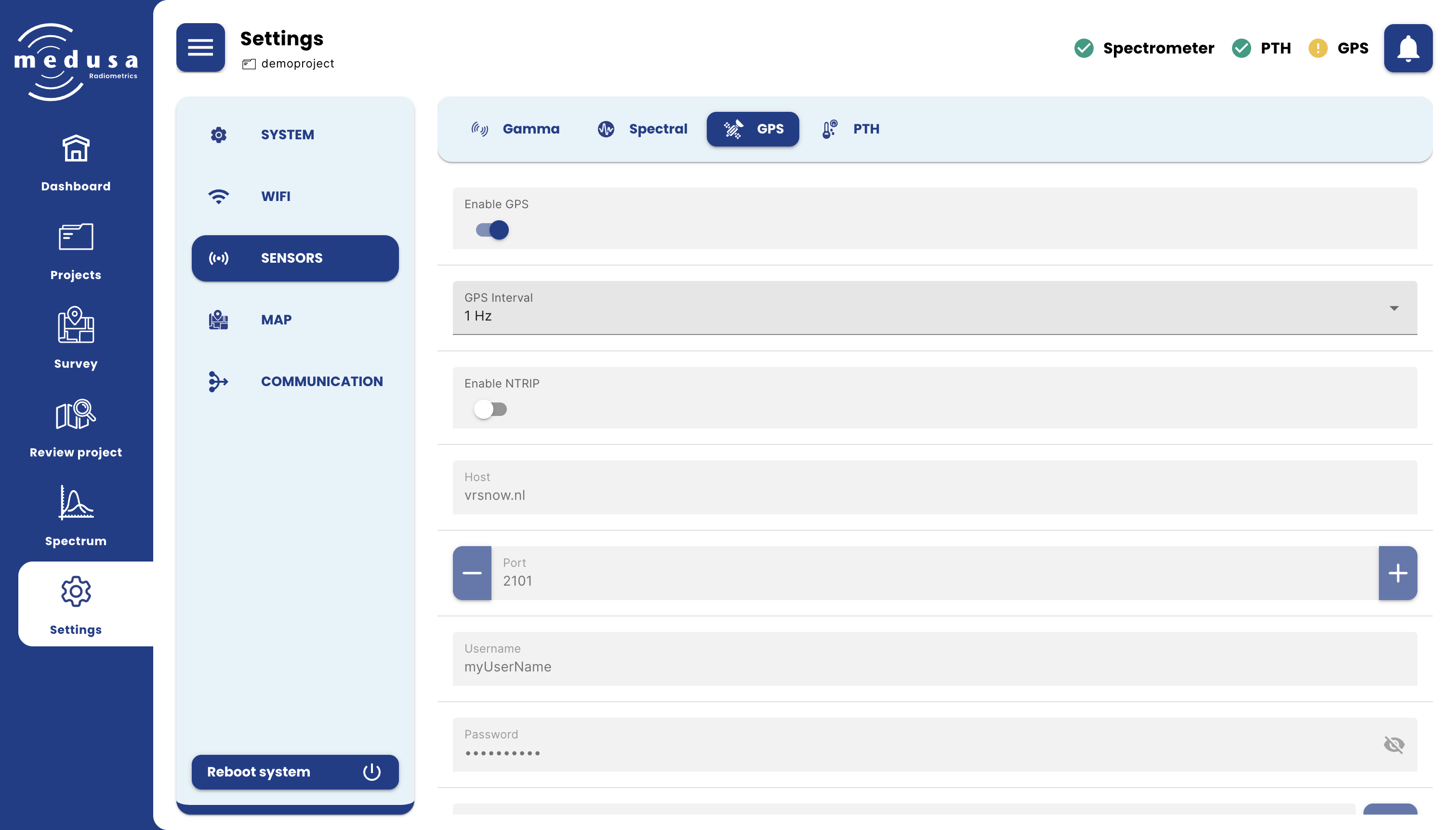
| Setting | Description |
|---|---|
| Enable GPS | Enables or disables the GPS sensor. |
| GPS Interval | How often the GPS records a position. Options: 2 Hz, 1 Hz, 0.50 Hz, 0.25 Hz, 0.10 Hz. |
NTRIP
NTRIP delivers GPS correction data over the internet to enable RTK (Real-Time Kinematic) positioning for centimetre-level GPS accuracy. An account with an external NTRIP service provider is required.
| Setting | Description |
|---|---|
| Enable NTRIP | Enables or disables the NTRIP correction stream |
| Host | The hostname or IP address of the NTRIP server |
| Port | The port of the NTRIP server |
| Username | The username for the NTRIP service |
| Password | The password for the NTRIP service |
| Mountpoint | The NTRIP mountpoint to use. Click the refresh button to retrieve available mountpoints from the configured host. |
Click Save to apply changes.
Info
Note: Some NTRIP services send corrections that depend on the receiver's location. These services will only start working once the detector has a valid GPS position to send to the NTRIP server.
PTH
The PTH tab configures the pressure, temperature, and humidity sensor.
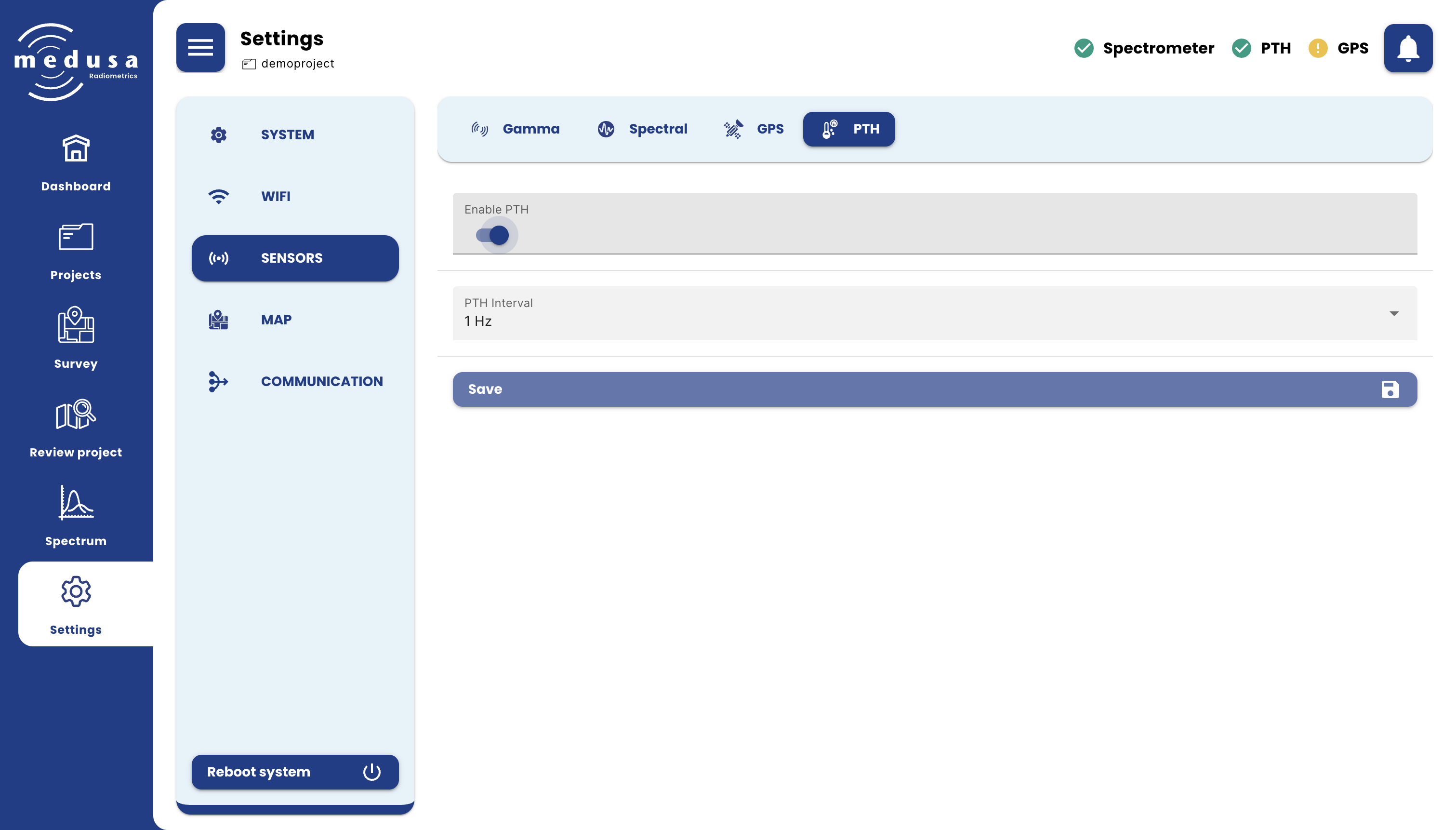
| Setting | Description |
|---|---|
| Enable PTH | Enables or disables the PTH sensor. |
| PTH Interval | How often the PTH sensor records a measurement. Options: 2 Hz, 1 Hz, 0.50 Hz, 0.25 Hz, 0.10 Hz. |
Click Save to apply changes.